
Uncategorized
What Shows Up When an ID Is Scanned? The Ultimate 2025 Guide
What Shows Up When an ID Is Scanned? The Ultimate 2025 Guide
Understanding What Shows Up When an ID Is Scanned
In this guide, we will explain what shows up when an ID is scanned and how businesses process your information safely and securely.
If you’ve ever handed over your ID at a bar, airport, hotel, or security gate, you might have wondered:
“What exactly shows up when someone scans my ID?”
This question has become more common as digital verification systems and ID scanning technologies become widespread. Today, bars, casinos, retailers, airports, delivery services, car rentals, and even online platforms rely on ID scans for age verification, identity validation, security checks, fraud prevention, and regulatory compliance.
But most people have no idea what these scanners actually read — or what information they store.
This ultimate guide explains everything you need to know, including:
- What information appears when an ID is scanned
- What businesses can see (and what they can’t)
- The technical breakdown of barcodes and magnetic stripes
- Legal limitations by region
- Whether ID scanning is safe
- What companies store — and how to protect yourself
- Differences between US, Canadian, UK, and EU ID data
- The future of ID scanning
Knowing what shows up when an ID is scanned helps you protect your privacy.
What Information Shows Up When an ID Is Scanned?(ID scanner information)
When an ID is scanned, the scanner extracts visible printed data and encoded machine-readable data.
Although every country issues IDs differently, most digital ID systems follow the same structure. Below is a breakdown of the most common data fields that appear during a scan.
1. Full Legal Name
The scanner reads your full name exactly as printed:
- First Name
- Middle Name (if present)
- Last Name
- Suffix (Jr., Sr., II, III, etc.)
Some IDs also include aliases, previous names, or maiden names, but these are typically not included in the barcode.
2. Date of Birth (DOB)
A primary reason IDs are scanned is age verification. The scanner instantly confirms whether:
- The customer is 18+
- The customer is 21+ (alcohol in the U.S.)
- The customer meets age-based restrictions (gambling, tobacco, cannabis, adult venues, etc.)
In most jurisdictions, age verification is the #1 reason IDs are scanned.
3. Full Residential Address
Common fields extracted:
- Street Address
- Apartment / Unit Number
- City
- State / Province
- ZIP / Postal Code
Important note: Some businesses purposely disable address display for privacy reasons, but the information is still in the barcode unless legally restricted.
4. ID Number or Driver’s License Number
This is the unique identifier associated with the cardholder.
Scanners use this field to detect:
- Fake IDs
- Duplicate IDs
- Expired or suspended licenses
- Fraudulent attempts to enter age-restricted venues
This number is almost always stored in the barcode (PDF417).
5. Expiration Date and Issue Date
These fields show:
- When the ID was issued
- When the ID expires
- Whether the ID is legally valid
Many businesses face fines if they accept expired identification, which is why scanners are used.
6. Photograph Embedded in the Card
Most scanners display the photo printed on the card so the staff can:
- Verify the person matches the ID
- Prevent identity fraud
- Compare face structure, hairline, and other biometric cues
Note: The photo is not extracted from the barcode — it’s simply shown from the front of the card.
7. Physical Characteristics
Depending on the country, IDs may include:
- Sex / Gender
- Height
- Weight
- Eye Color
- Hair Color
- Organ Donor Status
- License Class or Restrictions
When encoded in the barcode, these details appear on the scanner.
8. Barcode Data (PDF417)
The PDF417 barcode is the most important part of the ID.
It stores digitally encrypted data, such as:
- Full name
- Address
- Birthdate
- ID number
- Class type (for driver’s licenses)
- Restrictions (vision correction, learning permits, etc.)
- Endorsements (commercial vehicles, motorcycles)
- Security codes for validation
- Issuing state or agency
Not all of this data is shown to businesses — it depends on the scanner and legal regulations.
9. Magnetic Stripe or NFC Chip Data
Some IDs include:
- A magnetic stripe (similar to a credit card)
- An NFC or RFID chip
These are primarily used for:
- Government authentication
- Touchless verification
- Secure-access buildings
- Border crossings
Data may include:
- Encrypted identity keys
- Machine-readable travel zone (MRTD) data
- Internal card serial numbers
Most consumer businesses cannot legally read this encrypted data.
Businesses should clearly inform customers about what shows up when an ID is scanned
What Does NOT Show Up When an ID Is Scanned? (Important for Privacy)
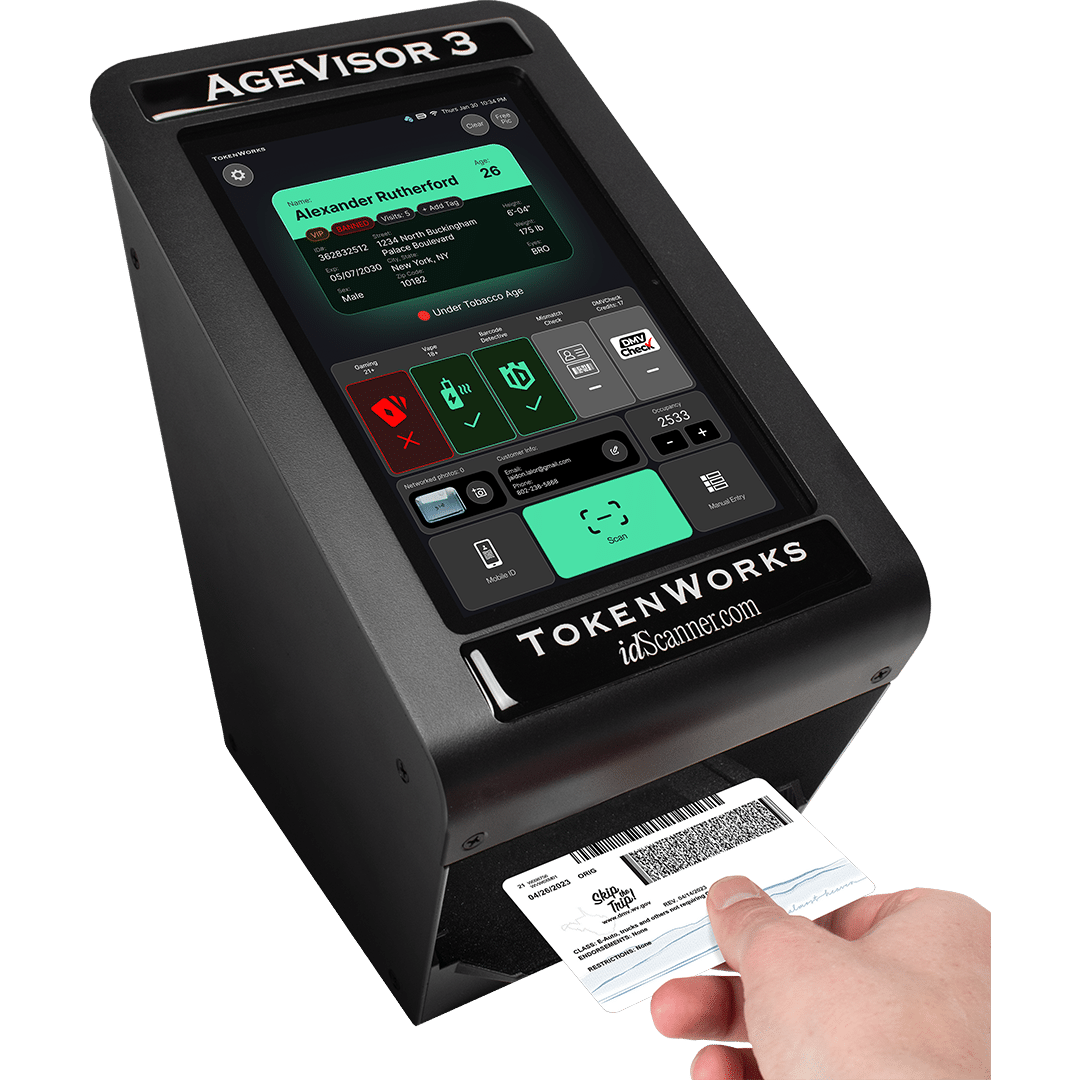
A major misconception is that scanning an ID exposes deeply personal information.
In reality, scanning an ID does NOT reveal:
- Bank accounts
- Full Social Security Numbers
- Your criminal record
- Your medical records
- Your immigration status
- Your financial history
- Private government databases
- Phone numbers
- Email addresses
- Driving history details (tickets, accidents, violations)
ID scanners only show what is physically printed or encoded on the card itself.
Why Do Businesses Scan IDs? 15 Legit Reasons
Here are the top reasons businesses rely on ID scanning today.
1. Age Verification (Most Common Use Case)
Essential in:
- Bars
- Clubs
- Liquor stores
- Casinos
- Cannabis dispensaries
- Tattoo shops
- Tobacco retailers
Digital scanners minimize fake ID usage.
2. Fraud Prevention
ID scanning helps detect:
- Counterfeit IDs
- Borrowed IDs
- Forged barcodes
- Tampered cards
- Fake names or addresses
3. Security and Access Control
Used by:
- Office buildings
- Airports
- Government facilities
- Stadiums
- Concert venues
- Hotels
- High-security job sites
4. Customer Check-In and Identity Verification
For:
- Car rentals
- Hotel check-ins
- Doctor’s offices
- Banks & credit unions
- Apartment leasing offices
- Package delivery services
5. KYC (Know Your Customer) Compliance
Fintech companies and banks must verify identities to comply with:
- Anti-money laundering (AML) laws
- Anti-terrorism financing laws
- Financial regulations
6. Legal Liability Protection
Businesses protect themselves against fines by proving:
- IDs were verified
- Customers were of legal age
- Records were securely logged
7. Loyalty Programs
Some retailers verify identities for:
- Member-only discounts
- Casino reward cards
- VIP programs
Do ID Scanners Store Your Information?
Whether data is stored depends on the type of scanner.
Type 1: Read-Only ID Scanners
These scanners:
- Display information
- Do NOT save data
- Do NOT upload to databases
Used in bars, events, and restaurants.
Type 2: Data-Storage ID Scanners
These scanners can save:
- Names
- Addresses
- Dates of birth
- Time and location of scan
Used in:
- Hotels
- Casinos
- Airports
- Security checkpoints
- Government buildings
Some regions allow this, others restrict it heavily.
Is It Safe to Have Your ID Scanned?
In general, yes — but with important precautions.
The act of scanning your ID itself is not harmful, because the scanner reads data that is already visible on the card.
However, risks come from the business or software, such as:
- Data breaches
- Illegal storage of your information
- Reselling customer information
- Poor data encryption
- Employees misusing stored IDs
To stay safe:
You should ask:
- “Do you store the data from my ID?”
- “How long do you keep it?”
- “Is the information encrypted?”
- “Is it shared with third parties?”
How Do ID Scanners Work? (Technical Breakdown)
Let’s explore each scanning technology.
1. OCR (Optical Character Recognition)
Used to read printed text on the ID:
- Name
- Address
- Dates
- License class
- ID number
OCR is used by apps like:
- Hotel kiosks
- Online identity verification platforms
- Mobile scanning apps
2. PDF417 Barcode Scanning
This is the main technology for North American IDs.
The PDF417 barcode stores both human-readable and machine-readable data, including:
- Full name
- Address
- Date of birth
- License number
- Endorsements
- Restrictions
- Security features
It’s fast, reliable, and difficult to forge.
3. Magstripe Scanning
Older IDs include a magnetic stripe similar to a credit card.
This stripe may include:
- ID number
- Birthdate
- Issue date
- Expiration date
- Security codes
4. Contactless NFC / RFID Chips
Used mostly in:
- Passports
- National ID cards
- Digital identity cards
- High-security IDs
These chips contain:
- Encrypted biometric data
- MRZ (Machine Readable Zone) data
- Internal certificate keys
Most commercial businesses cannot access chip data due to government encryption.
International Differences: What Shows Up When IDs Are Scanned Around the World

Knowing what shows up when an ID is scanned helps you protect your privacy
United States
Most states use:
- PDF417 barcode
- Magstripe (declining)
- Visible printed information
U.S. barcodes typically contain:
- Name
- Address
- DOB
- License number
- Issue & expiration date
- Height, weight, eye color
Canada
Canadian IDs include:
- PDF417 barcode
- Holographic security layers
- Optional RFID
Barcodes contain similar fields to U.S. licenses but sometimes include:
- Internal ID card serial numbers
- Province-specific security codes
United Kingdom
UK driver’s licenses use:
- 2D barcodes
- OCR-readable text
- Machine-readable zones
UK IDs rarely store full address data in the barcode.
European Union
EU passports include:
- RFID biometric chip
- MRZ data
- Digital signatures
EU national IDs vary but often include:
- Full name
- DOB
- National ID number
- Security keys
Australia & New Zealand
These IDs include:
- PDF417
- Photo ID card numbers
- Address data
- License conditions
Extended SEO FAQ: What Shows Up When an ID Scanned?
Q1 — Do ID scanners show your Social Security number?
No. Modern IDs no longer include full SSNs.
Q2 — Can a bar see your address?
Yes, if their scanner is configured to read the barcode.
Q3 — Can a business store your ID data?
Yes in some regions, no in others. It depends on local privacy laws.
Q4 — Can ID scanners detect fake IDs?
Yes — up to 90%, depending on the technology.
Q5 — Does scanning my ID give access to government databases?
No. Scanners do NOT access internal government systems.
Q6 — Can someone steal my identity by scanning my ID?
Only if they store your data improperly. The scanner itself is not dangerous.
Q7 — What is the safest way to let someone scan your ID?
Choose certified businesses using encrypted digital systems.
Conclusion
Understanding what shows up when an ID is scanned is essential in today’s digital world. Whether you’re being checked at a bar, boarding a flight, verifying your identity online, or entering a secure facility, ID scanners read a limited set of encoded and printed data — nothing more.
These scanners help businesses verify age, reduce fraud, and comply with regulations. While the scanning process itself is safe, your privacy depends on how the business handles your data.
Note: Find the best quality fake IDs that are scannable and undetectable on the website “club21idss.com”
